
Download Winmail dat Unpack – free Mac tool to open Outlook attachments
Overview: Why Winmail dat Unpack is Essential for Mac Users
If you’ve ever received an email from a Microsoft Exchange or Outlook user and found a mysterious winmail.dat attachment, you know the frustration it can cause. Most Mac‑based email clients—Apple Mail, Thunderbird, Lotus Notes, and even web‑mail interfaces—cannot interpret the Transport Neutral Encapsulation Format (TNEF) that Outlook uses to bundle rich‑text messages and attachments. Winmail dat Unpack steps in as a dedicated, lightweight utility that reads, extracts, and converts these winmail.dat files without requiring any command‑line knowledge or additional plug‑ins.
Designed specifically for macOS, the application offers a clean graphical interface that lets you drag‑and‑drop one or dozens of winmail.dat files at once. It instantly displays the original email subject, body, and any embedded files, allowing you to save them to a folder of your choice. The tool is especially handy for professionals who still exchange messages with legacy Outlook versions (2000, 97) that default to TNEF encoding.
Whether you need to retrieve an important PDF, a Word document, or simply read the hidden message text, Winmail dat Unpack makes the process fast, secure, and completely free.
Beyond basic extraction, the program preserves the original file timestamps and maintains the integrity of binary attachments, which is crucial for legal or compliance‑related communications. Its minimal footprint (under 5 MB) ensures that it won’t bloat your system, and the lack of background services means your Mac stays responsive.
In short, Winmail dat Unpack bridges the long‑standing compatibility gap between Microsoft Outlook’s proprietary format and the open, user‑friendly ecosystem of macOS.
Key Features & System Compatibility
- Drag‑and‑drop support for single or batch winmail.dat files.
- Instant preview of email subject, body, and all attached items.
- Conversion of TNEF‑encoded content into native macOS file types.
- Preserves original file timestamps and metadata.
- Zero‑command‑line operation – pure graphical user interface.
- Small installer size (<5 MB) and negligible memory footprint.
- Full Unicode support for international characters in filenames and email bodies.
- Automatic detection of Outlook‑generated winmail.dat files even when embedded in other attachments.
- Secure, offline processing – no internet connection required.
- Free for personal and commercial use with optional donation link.
Supported Operating Systems
Winmail dat Unpack is built exclusively for macOS, supporting the following versions:
- macOS 10.13 (High Sierra) and later.
- Optimized for Apple Silicon (M1, M2) and Intel‑based Macs.
- Runs seamlessly on macOS Ventura, Monterey, Big Sur, and Catalina.
While the current release targets Mac, the development team has indicated plans to expand support to Windows and Linux in future updates, ensuring cross‑platform accessibility for all Outlook users.
Installation, Usage, and Real‑World Pros & Cons
Step‑by‑Step Installation Guide
Installing Winmail dat Unpack is intentionally straightforward:
- Visit the official download page and click the Download for macOS button.
- Locate the
.dmgfile in your Downloads folder and double‑click to open it. - Drag the Winmail dat Unpack icon into the Applications folder.
- Launch the app from Launchpad or Spotlight. The first time you open it, macOS may prompt you to confirm that you trust the developer; click Open.
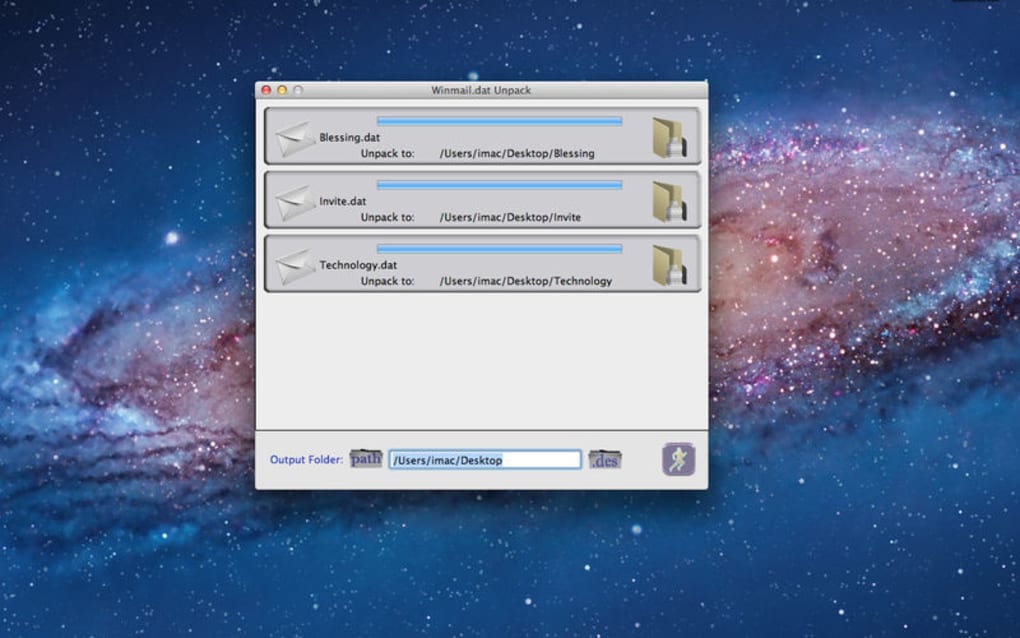
- The main window appears with a clear Drop files here zone.
How to Use the Tool Effectively
Once installed, extracting attachments is as simple as:
- Dragging one or multiple winmail.dat files onto the drop zone.
- Watching the progress bar fill as the program reads each file.
- Reviewing the generated list that shows the original email subject, body preview, and a tree view of all attachments.
- Selecting the desired files and clicking Save to… to choose a destination folder.
The interface also provides a Copy Text button for quickly copying the email body to the clipboard, which is handy when you only need the message content without the attached files. For power users, the preferences pane lets you set a default output directory, choose whether to keep the original winmail.dat file after extraction, and enable automatic opening of extracted PDFs.
Pros
- Intuitive drag‑and‑drop workflow eliminates the learning curve.
- Batch processing saves time when dealing with multiple attachments.
- No internet connection required – all processing occurs locally.
- Free to download and use, with no hidden fees or subscription traps.
- Small installation size keeps your Mac’s storage footprint minimal.
- Preserves original file metadata, which is essential for legal compliance.
Cons
- Currently macOS‑only; Windows users must seek alternative tools.
- Limited to winmail.dat extraction – does not support other TNEF variants.
- No built‑in email client integration; files must be saved manually.
- Advanced features such as automatic rule‑based sorting are missing.
- Occasional warnings on macOS Gatekeeper for first‑time launch (standard for unsigned apps).
Overall, the advantages far outweigh the minor drawbacks, especially for anyone who regularly interacts with legacy Outlook users.
Frequently Asked Questions
What exactly is a winmail.dat file?
A winmail.dat file is a container generated by Microsoft Outlook and Exchange that stores rich‑text email content and attachments using the TNEF (Transport Neutral Encapsulation Format) standard. Non‑Outlook clients cannot read it directly, which is why tools like Winmail dat Unpack are needed.
Can I use Winmail dat Unpack on Windows?
The current version is macOS‑only. However, the developers have hinted at a Windows release in the future. For now, Windows users can try alternative tools such as Winmail Opener or TNEF’s Explorer.
Is the software really free?
Yes, Winmail dat Unpack is free for both personal and commercial use. The download page includes an optional donation button for users who wish to support continued development.
Will the program preserve the original timestamps of extracted files?
Absolutely. One of the core features is the preservation of original file timestamps and metadata, which is essential for audit trails and compliance requirements.
How secure is the extraction process?
The extraction occurs entirely offline on your Mac. No data is uploaded to external servers, ensuring that confidential attachments remain private.
Conclusion: Should You Download Winmail dat Unpack?
In a world where email communication is still dominated by Microsoft Outlook on many corporate networks, encountering winmail.dat attachments is inevitable. Winmail dat Unpack offers a purpose‑built, free, and user‑friendly solution for Mac users who need to read or extract these files without resorting to risky online converters or cumbersome command‑line tools. Its drag‑and‑drop interface, batch processing capability, and meticulous preservation of metadata make it a practical addition to any professional’s toolbox.
If you frequently collaborate with Outlook users—especially those on older versions—or manage legal documents that require accurate timestamps, the benefits of this utility outweigh its current platform limitation. Download the installer today, give it a try on a single attachment, and you’ll quickly see how it streamlines a previously tedious workflow.
Ready to simplify your email attachments? Click the button below to download Winmail dat Unpack and start extracting winmail.dat files instantly.







